This page is written by the DreamCore team, so we are one of the products in the table. We compare five practical questions for a first game: can you make it on a phone, do you write in chat or work in code or events, does it do 3D, can a photo become the hero, and how do friends play it. Facts about the other tools come from their official pages checked on October 28, 2026. We have not run the same project in every tool, so this is not a quality ranking.
The short answer
- You only have a phone and want to make something today: DreamCore. You describe the game in chat in your phone's browser and send the link.
- You want AI help but also want to open and edit the JavaScript: Rosebud describes both on its official pages.
- You want to learn a full engine and export to stores or Steam: GDevelop, an open-source 2D and 3D engine with a no-code event system and apps for computers and phones.
- You want to build inside Roblox for Roblox players: Roblox Studio, a free app for Windows and Mac.
Compare the five questions
| Question | DreamCore | Rosebud (official pages) | GDevelop (official pages) | Roblox Studio (official docs) |
|---|---|---|---|---|
| Can I make a game on a phone? | Yes, in the phone's browser (iPhone and Android). An iOS app is optional. | Says it works on any device with a browser. It does not say whether building on a phone is comfortable. | Editor as a web app and as apps for Windows, macOS, Linux, Android and iOS. | No. Studio runs on Windows and Mac only. |
| How do I make it? | Write the game in chat; each message changes the same game. No code or editor to learn. | Describe changes in plain English, or open and edit the JavaScript. | Events (no-code logic) and an AI tutor that helps build mechanics. | A 3D editor with Luau scripts; Roblox Assistant (AI) can edit scripts and objects. |
| 3D? | Yes, press 3D. Phones get touch controls like an on-screen joystick. | Yes, WebGL with Three.js. | Yes, 2D and 3D. | Yes, Roblox is 3D. |
| Can a photo become the hero? | Yes. Tap Image and take a photo or pick one. | Not stated on the page we checked; it lists sprite and sprite-sheet generators. | Not covered in this comparison. | Not covered in this comparison. |
| How do friends play it? | Send a link. They play in the browser with no app and no account. | Publishing gives a link that plays in the browser. | Package for web, desktop or mobile; games can be played on gd.games. | Players open your experience on Roblox. |
Sources: Rosebud online game maker, Rosebud pricing, GDevelop download page, GDevelop home page, Roblox Studio setup and Roblox Assistant guide. Plans and features change, so check those pages before you commit. For a closer look at one tool, see our Rosebud comparison.
What about price?
DreamCore's free plan lets you make, play and share games, with a daily limit on new games and chat edits. There is no payment step to start. Rosebud's pricing page describes starting credits and paid plans. GDevelop is open source and lists paid plans for extra features. Roblox Studio is free to download. Free allowances differ in kind, so compare what you can actually finish with each one, not the headline number.
Test the same small game everywhere
The fairest test is the same tiny game in each tool: a player moves left and right, catches stars for 20 seconds, sees a score and can restart. Ask for touch controls and keyboard controls.
- Time how long it takes from opening the tool to the first playable round.
- Play to the end and check the score.
- Ask for one change, like slower stars, and test again.
- Send the link to a friend's phone and see if it opens without installing anything.
A tool that fits your first game may not be the one you pick for a big project or a store release. That is fine: start where you will actually finish.
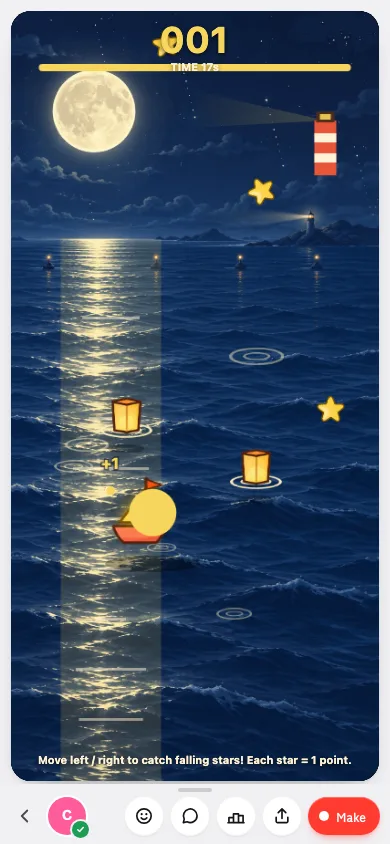
An actual DreamCore generation: Star Harbor: Star Catch
This product demonstration was generated on 2026-10-25 and tested on 2026-10-25 using an internal account excluded from growth metrics. This is a recorded example, not a promise that every generation will behave the same way.
The submitted prompt
Create an original 2D browser game called Star Harbor. A small coral boat catches falling golden stars on a deep blue night sea. Move left and right with the arrow keys, A/D, or by dragging on a phone. Each caught star adds one point. A round lasts exactly 20 seconds, then stops and shows the final score and a Play again button that resets the score and timer. Show a clear Start button before the round, brief English instructions, score and remaining time. Use simple original vector shapes, gentle particles and no external assets or copied characters. Make all controls and text fit a narrow phone screen. Make the boat responsive and let a beginner catch a few stars easily. Use English for all game text.
What happened after generation
The first generation produced a moonlit sea and boat, but was missing the requested start, timer, ending and restart flow. We sent one follow-up correction asking for those controls and rules. The generated version uses image assets, despite the original request for simple vector shapes. The recording shows the corrected, published game.
What we checked
On the published game, an anonymous 390px browser test moved the boat with arrow keys and a touch drag, caught 11 stars, reached the result at 20 seconds, and used Play again to reset the score to zero and timer to 20 seconds. We skipped the optional leaderboard name prompt. This is a browser check, not a physical-phone compatibility test.
Play Star Harbor: Star Catch · View the demonstration author
Share this example
Use the recording and image to introduce this example. They show this game, not every game made on DreamCore.
Games people made on DreamCore
These are community games on DreamCore, not benchmark results.

Hide n seek
by JMB
20 plays

Chibi Class Brawl
by 3432
18 plays

Pull! Hero and Karakasa
by 香る
274 plays

So True! Anything Affirmation Rhythm
by Kosuke
71 plays

Fruit Ninja! Slice Master
by パンパンマン
61 plays

Manya's Sweet Dungeon
by シトラス
43 plays

Neon Swing Racer (Remix)
by ラミー
39 plays

Slice It! Fruit Artisan
by んあーーーーーーーー
38 plays
Frequently asked questions
Which AI game maker works best on a phone?
For making a game on a phone alone, DreamCore is built for it: you write in chat in the phone's browser and share a link. GDevelop also has phone apps for its full editor. Roblox Studio needs a Windows or Mac computer.
Do I need to know how to code?
Not for DreamCore, where you describe the game in chat. Rosebud offers plain-English edits and code. GDevelop uses no-code events. Roblox Studio games use Luau scripts, which its AI assistant can help write.
Can my friends play without installing anything?
With DreamCore and Rosebud, a link opens in the browser. GDevelop can publish to the web. Roblox experiences are played on Roblox.
Is this comparison independent?
No. The DreamCore team wrote it and runs one of the products. The other tools' facts come from their official pages on October 28, 2026; we have not run a matched quality, speed or cost benchmark.
Is DreamCore affiliated with Rosebud, GDevelop or Roblox?
No. The names belong to their owners and are used only to describe their products.